To mount the housing:
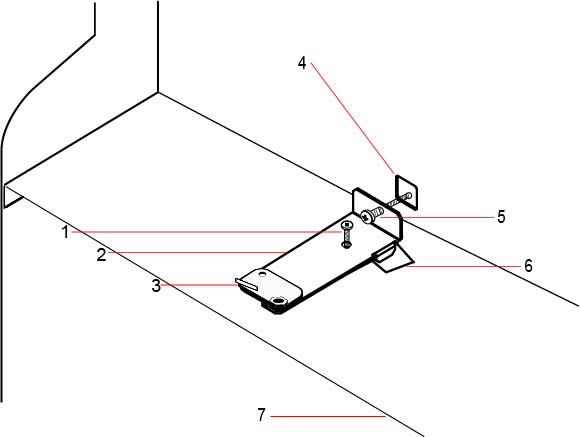
The G5 housing is pre-configured for front tamper only. To configure the housing for both front and back tamper, remove the front tamper securing screw (item 1).
The tamper bracket swings to the far right of the orientation slot (item 6).
Move the tamper bracket to the far left of the orientation slot and tighten the back tamper screw (item 5) to the wall. The tamper bracket should be perpendicular to the back wall of the housing.
|
Number |
Description |
Number |
Description |
|---|---|---|---|
| 1 |
Front tamper securing screw |
5 |
Back tamper screw |
| 2 |
Tamper bracket |
6 |
Orientation slot |
| 3 |
Tamper switch |
7 |
Shelf separating battery compartment |
| 4 |
Back tamper cutout |
| WARNING: If the back tamper screw is not secure against the wall, then tamper protection is compromised. If the housing is removed from the wall or displaced, the back tamper contact needs to be tested again for proper functionality and re-adjusted if required. |