Wireless
Wireless sensor detection (868MHz) on the SPC panel is provided by wireless modules. There are two types of wireless modules: one way SiWay RF Kit (SPCW110, 111, 112, 114 ) and two way SPCW120 Wireless Transceiver. The SiWay RF Kit is fitted in the controller, on the keypad, or by installing a wireless expander. The SPC two way wireless module is fitted into modem slot 2 of the control panel. See the table below for information on which devices can be enrolled with each type of transceiver.
|
For CE regulatory compliance, the SPCW120 product can only be fitted to the following products:
|
Devices compatible with a one way transceiver
|
Wireless sensors |
ADM-I12W1 |
Wireless Fresnel PIR detector, 12m wide angle |
|
IR160W6-10 |
Wireless PIR detector with black triplex mirror, 18m wide angle, 868MHz |
|
|
IMKW6-10 |
Wireless magnet contact, 868MHz |
|
|
IMKW6-10B |
Wireless magnet contact, 868MHz (brown) |
|
|
OPZ-W1-RFM6 |
SiWay radio module (plug-in to smoke alarm) |
|
|
IRCW6-11 |
Remote control FOB with 4 button control |
|
|
IPAW6-10 |
Personal transmitter |
|
|
WPA |
Wireless personal alarm |
|
Devices compatible with a two way transceiver
|
Wireless sensors |
WPIR |
Wireless 12m PIR detector with pet immunity option |
|
WPIR-CRT |
Wireless curtain PIR detector |
|
|
WMAG |
Wireless magnetic contact (slim) |
|
|
WMAG-I |
Magnetic contact with additional input |
|
|
WRMT |
Remote control FOB with 4 button control |
|
|
WPAN |
Wireless personal alarm button |
|
|
For instructional videos on wireless devices and transceivers please go to http://van.fyi?Link=Wireless_devices. |
View a list of wireless sensors
To view a list of wireless sensors and information about the sensors, select Configuration > Hardware > Wireless .
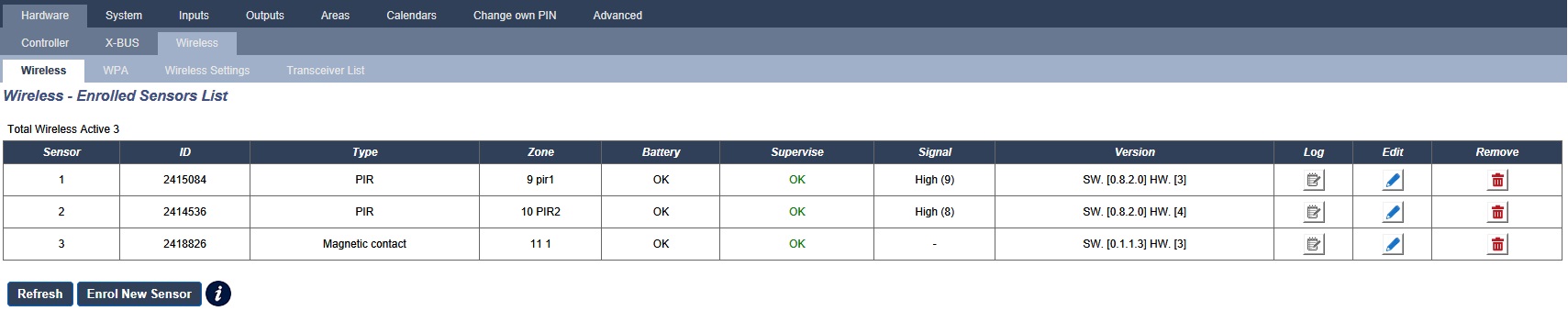
Wireless sensor information
|
Wireless Sensor |
The number of the sensor enrolled on the system (1 = first, 2 = second, etc.). |
|
ID |
A unique identity number for that sensor. |
|
Type |
The type of wireless sensor detected (magnetic contact, inertia/shock, etc.). |
|
Zone |
The zone to which the sensor has been enrolled. |
|
Battery |
The status of the battery in the sensor. |
|
Supervise |
The status of the supervisory operation (OK = supervisory signal received, Not Supervised = no supervisory operation). |
|
Signal |
The signal strength received from the sensor (01 = low, 09 = high).Note: Although it is not possible to enroll a device with a signal strength less than 3, devices whose signal drops below 3 after enrolment are not dropped. |
|
Version |
The version details of the sensor. |
Performable actions
|
Log |
Click to view the wireless sensor Log. See Log - Wireless sensor X. |
|
Enrol New Sensor |
Click to enrol a new sensor. |
|
Refresh |
Click to refresh the list of enrolled sensors. |
|
Edit |
Click to edit the sensor attributes. |
|
Remove |
Click to remove the sensor from the enrolled sensors list. |