Mounting a G2 housing
The SPC G2 housing is supplied with a metallic or plastic cover. The cover is attached to the base of the housing by 2 securing screws located on the top and bottom of the front cover.
To open the housing, remove both screws with the appropriate screwdriver and lift the cover directly from the base.
The G2 housing contains the controller PCB (Printed Circuit Board) mounted on 4 support pillars. An optional input/output module can be mounted directly beneath the controller PCB. A battery with capacity of 7Ah max. can be accommodated below the controller.
An optional external antenna must be fitted to housings with metallic lid if the wireless functionality is required. If an antenna is fitted to the unit, it must be enabled in the firmware.
The SPC G2 housing provides 3 screw holes for wall mounting the unit.
To wall mount the housing, remove the cover and locate the initial fixing screw hole at the top of the housing. Mark the position of this screw hole on the desired location on the wall and drill the initial screw hole. Screw the unit to the wall and mark the position of the bottom 2 screw hole positions with the unit vertically aligned.
Screws with a 4–5mm shank, a minimum head diameter of 8mm and a minimum length of 40mm are recommended for mounting the housing. Additional expansion plugs or fixings may be required depending on the construction of the wall.
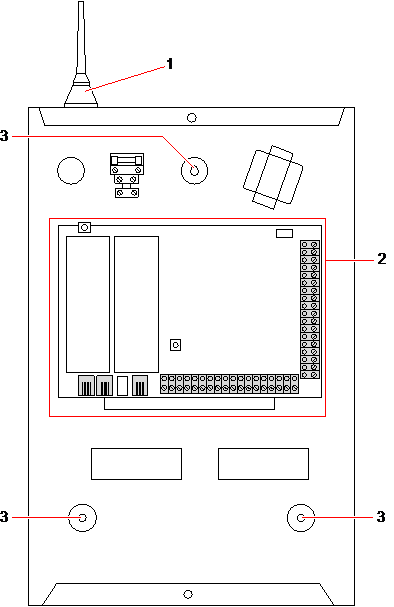
Standard housing
|
Number |
Description |
|---|---|
|
1 |
Wireless antenna |
|
2 |
SPC controller |
|
3 |
Wall mounting screw holes |